Age calculation looks simple at first. Most people think they only need to subtract the birth year from the current year.
But age is not based on the year alone. The month and day also matter. If you ignore them, the answer can be wrong by one full year.
These mistakes become more serious when age is used for school admission, exam eligibility, job applications, government forms, or official records.
Mistake 1: subtracting only the birth year
This is the most common mistake.
For example, if someone was born in 2000 and the current year is 2026, many people quickly say the age is 26.
But that may not be true. You must check whether the birthday has already passed in 2026.
If the birthday has not arrived yet, the completed age is still 25.
Example of wrong year subtraction
Take this example.
Date of birth: 10 December 2000
Target date: 5 March 2026
If you subtract only the years:
2026 – 2000 = 26
But the birthday on 10 December has not arrived yet in 2026. So the person has not completed 26 years.
The correct completed age is:
25 years
Mistake 2: ignoring the month and day
Age depends on the full date of birth, not just the year.
The birth month and birth day decide whether the current year is already completed or not.
For example, a person born on 15 May completes one more year only on 15 May. On 14 May, that new age is not completed yet.
One day can change the result.
Mistake 3: using today’s date instead of the cut-off date
This mistake is common in school, exam, and job applications.
Many forms ask age as on a fixed date. That date is called the cut-off date.
If the form says age should be calculated as on 1 August 2026, you must use 1 August 2026 as the target date. Do not use today’s date unless the form asks for current age.
Example of cut-off date mistake
Suppose a candidate was born on 10 September 2008.
The exam cut-off date is:
1 August 2026
The candidate completes 18 years on 10 September 2026. But on 1 August 2026, the candidate has not completed 18 years yet.
If the exam requires minimum 18 years on 1 August 2026, the candidate may not be eligible.
Mistake 4: entering the wrong date format
Date format mistakes can completely change the result.
For example:
05/10/2000
This can mean 5 October 2000 or 10 May 2000, depending on the format.
If you enter the wrong format, the calculator may still give a result, but that result will be based on the wrong date.
How to avoid date format mistakes
Check the date format before entering the date.
Common formats are:
DD/MM/YYYY
MM/DD/YYYY
YYYY-MM-DD
If the website has a date picker, use it. If you are writing manually, using the month name is clearer.
For example:
10 May 2000
This is easier to understand than 10/05/2000.
Mistake 5: not checking leap years
Leap years can affect total days, total weeks, birthday countdowns, and date differences.
A normal year has 365 days. A leap year has 366 days. The extra day is 29 February.
If you calculate age in total days by multiplying years by 365, the result will be only a rough answer. It will miss leap year days.
Mistake 6: treating every month as 30 days
Some people calculate age by treating every month as 30 days.
This is not accurate because months have different lengths.
January has 31 days. April has 30 days. February has 28 days in a normal year and 29 days in a leap year.
So exact age should be calculated using the real calendar, not a fixed 30-day month rule.
Mistake 7: forgetting February 29 birthdays
People born on 29 February need special care because their birth date appears only in leap years.
In normal years, some people celebrate on 28 February. Some celebrate on 1 March.
For personal use, either method may be followed. For official use, follow the rule given by the school, exam board, job department, or legal authority.
Mistake 8: confusing completed age and running age
Completed age means the full years already completed.
Running age means the year of life currently going on.
For example, if a child is 5 years and 3 months old, the completed age is 5 years. Some people may say the child is in the 6th year of life.
For official forms, completed age is usually used.
Example of completed age
If someone was born on 15 May 2020 and the target date is 20 August 2025, the person has completed 5 years.
The exact age is:
5 years, 3 months, 5 days
The completed age is still 5 years, not 6 years.
Mistake 9: ignoring maximum age limits
Many people check only the minimum age and forget the maximum age.
This happens in job applications, exam forms, scholarships, and sports registrations.
For example, a job may allow candidates from 18 to 30 years. If your age is 30 years, 11 months, and 20 days on the cut-off date, you may have crossed the maximum age limit unless relaxation applies.
Mistake 10: ignoring age relaxation rules
Some exams and jobs allow age relaxation for certain categories.
Age relaxation usually increases the maximum age limit. But it does not change your date of birth or the cut-off date.
For example, if the maximum age is 30 years and relaxation is 5 years, the allowed maximum age may become 35 years for eligible candidates.
Always read the official notification carefully.
Mistake 11: using rough age for official forms
Rough age may be okay for casual use, but it is not safe for official forms.
For example, saying “around 18 years” is not enough for exam eligibility. The form may need exact age on a fixed date.
For official use, calculate age in years, months, and days using the correct target date.
Mistake 12: not matching date of birth with documents
Your date of birth should match your official documents.
Common documents include birth certificate, school certificate, passport, Aadhaar card, PAN card, or other government ID.
If the date entered in the form does not match the document, it can create problems during verification.
Mistake 13: using the wrong target date
The target date is the date up to which age is calculated.
For normal use, the target date may be today. For school, exam, job, or application forms, the target date may be a fixed cut-off date.
Using the wrong target date can give a correct calculation for the wrong date. That is still a wrong result for your purpose.
Mistake 14: not checking the result before submitting
Many people enter the date and submit the form quickly.
Before submitting any important form, check the date of birth, target date, and calculated age once again.
A small typing mistake can change the result. It is better to spend one extra minute checking than to face correction problems later.
Mistake 15: thinking calculator result is official proof
An online age calculator helps you check your age, but it is not official proof.
For official proof, you need accepted documents. The calculator result can guide you, but it cannot replace a birth certificate, school certificate, passport, or government ID.
For exams and jobs, the official notification is the final rule.
Common mistake in school admission age
Parents sometimes calculate the child’s age using today’s date.
But schools usually use a cut-off date, like 31 March or 1 June.
If the child completes the required age after the cut-off date, the child may not be eligible for that class, even if the child completes the age soon after.
Common mistake in exam age calculation
Candidates sometimes check age based on the application date.
But exam notifications usually mention a specific date like 1 January, 1 July, or 1 August.
Use the date given in the notification. Do not guess.
Common mistake in job age calculation
Job applicants often check their current age and ignore the job cut-off date.
This can cause confusion when the applicant is close to the maximum age limit.
Always calculate age on the date mentioned in the job notice. Also check age relaxation if it applies.
How to calculate age correctly
To calculate age correctly, use the full date of birth and the correct target date.
Count completed years first. Then count completed months. Then count remaining days.
If you are using an online calculator, enter the date carefully and check the result before using it.
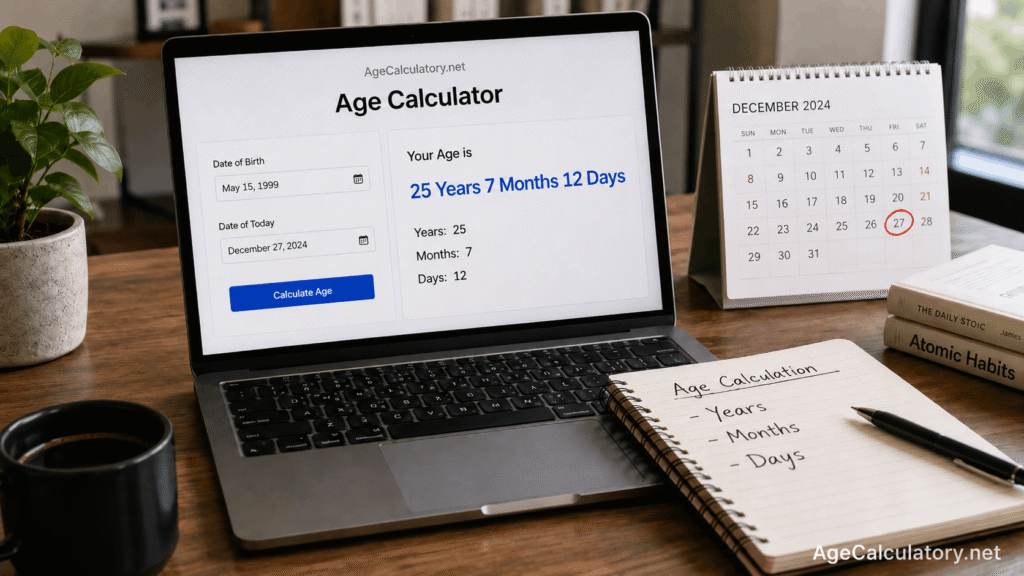
Correct age calculation example
Take this example.
Date of birth: 15 May 1999
Target date: 27 December 2024
From 15 May 1999 to 15 May 2024, the person completed 25 years. From 15 May 2024 to 15 December 2024, the person completed 7 months.
From 15 December 2024 to 27 December 2024, there are 12 days.
So the exact age is:
25 years, 7 months, 12 days
Use AgeCalculatory.net
You can use AgeCalculatory.net to avoid common age calculation mistakes.
Enter your date of birth and the correct target date. The tool can calculate your age in years, months, and days.
If you are checking eligibility for school, exams, jobs, or applications, use the official cut-off date as the target date.
Important note
An age calculator is helpful, but official rules still matter.
For school admission, follow the school notice. For exams, follow the exam notification. For jobs, follow the job advertisement.
Use the calculator for checking and use official documents for proof.
Frequently Asked Questions
What is the most common mistake while calculating age?
The most common mistake is subtracting only the birth year from the current year without checking the month and day.
Why is my age one year less than year subtraction?
This happens when your birthday has not arrived yet in the target year.
Should I use today’s date for age calculation?
Use today’s date for current age. For school, exam, job, or application rules, use the official cut-off date.
Does leap year affect age calculation?
Yes. Leap years affect total days, total weeks, birthday countdowns, and some exact date differences.
Why does date format matter?
Because 05/10/2000 can mean different dates depending on the format. A wrong format gives a wrong result.
Can I use an online age calculator for official forms?
You can use it for checking, but official proof depends on accepted documents and official rules.
How can I avoid age calculation mistakes?
Use the full date of birth, correct target date, official cut-off date, and a reliable age calculator.
Conclusion
Age calculation mistakes usually happen when people ignore the full date, use the wrong target date, or depend on rough year subtraction.
For accurate results, always use the date of birth, correct target date, and full calendar calculation.
Use AgeCalculatory.net to calculate age in years, months, and days and avoid common date counting mistakes.